


Best Accounting CRM Software: Accountants, Tax Professionals, CPAs Guide [2025]
![Best Accounting CRM Software: Accountants, Tax Professionals, CPAs Guide [2025]](https://uk.maximizer.com/wp-content/uploads/2025/05/Best-X-CRM-for-Accounting-Firms.jpg)
Summary of the Best Accounting CRM Software
Accounting firms face challenges like scattered client data, manual tasks, and limited team coordination. A purpose-built CRM improves workflows, automates admin, and improves client visibility. Tools like Maximizer CRM offer compliance support, key integrations, and customizable features to help firms work smarter and scale efficiently.
-
Maximizer CRM: Best for firms needing end-to-end workflow, compliance, and financial tool integration like QuickBooks.
-
TaxDome: All-in-one platform for managing documents, tasks, and client communication.
-
Accelo: Ideal for project-based firms focused on billing, time tracking, and service delivery.
-
HubSpot CRM: Best free option for solo accountants or small firms starting with CRM.
-
Zoho CRM: Affordable and highly customizable; great for firms using Zoho’s ecosystem.
Why accounting firms need a CRM
Challenges in accounting practice management
Accounting firms face a unique set of operational and organizational challenges that can limit their productivity and client service quality. Managing multiple clients, staying on top of deadlines, and coordinating with internal teams are constant demands. Without a centralized accounting CRM software, professionals often rely on scattered spreadsheets, email threads, and manual follow-ups, all of which increase the risk of errors and inefficiencies. These challenges become more pronounced as firms scale or take on more complex engagements. Whether it’s chasing down documents, tracking compliance steps, or assigning internal tasks, the lack of a structured system can significantly slow down workflows and reduce client satisfaction.
Here are five of the most common challenges faced by accounting firms:
-
Disorganized client data: Without a centralized platform, client records are often stored in multiple locations, increasing the risk of errors and duplication.
-
Manual task tracking: Relying on spreadsheets or email for managing deadlines leads to missed steps and poor visibility.
-
Inefficient internal collaboration: Team members lack clear accountability when there’s no shared view of tasks or responsibilities.
-
Communication breakdowns: Important emails and document requests often fall through the cracks without automated follow-ups.
-
Scaling limitations: As the firm grows, manual processes become bottlenecks that slow down service delivery.
How CRMs address accounting-specific needs
An accounting CRM for software isn’t just a general contact manager, it’s a strategic tool tailored to the way accountants, bookkeepers, and CPAs work. Unlike sales CRMs, accounting CRM software emphasizes task automation, deadline tracking, document management, and integration with key financial tools.
With the right CRM in place, accounting professionals can build repeatable workflows that match their unique client lifecycle, from onboarding and document collection to recurring reporting and filing. This reduces manual admin work and ensures that nothing falls through the cracks. More importantly, it supports better visibility into each client’s status, so teams can quickly identify what’s pending and who’s responsible. Maximizer CRM for accounting is a strong example of this functionality in action. It helps firms automate routine communication, organize tasks by engagement type, and track compliance activities without relying on multiple disconnected systems.
Benefits of CRM for CPAs, bookkeepers, and tax professionals
The best Accounting CRM Software helps transform everyday operations by turning disjointed tasks into structured, trackable workflows. For CPAs, bookkeepers, and tax professionals, a CRM improves everything from client onboarding to deadline tracking and internal collaboration. It enables firms to do more with less effort by centralizing all key information and automating repetitive administrative tasks.
A CRM for accountants also supports more accurate work. By providing visibility into each step of a client’s engagement, professionals can catch issues early and ensure regulatory compliance. The ability to manage multiple clients efficiently, while maintaining a high level of service, is a major advantage for both small firms and growing practices.
Here are the top five benefits of implementing accounting CRM software:
-
Improved task and workflow management: CRMs automate task creation and help keep projects moving forward without constant manual oversight.
-
Centralized client communication: All emails, messages, and document requests are tracked in one system for better clarity and continuity.
-
Higher accuracy and compliance: Built-in reminders, audit trails, and version control reduce errors and support regulatory requirements.
-
Increased team efficiency: Everyone works from the same dashboard, improving coordination and accountability.
-
Scalable client service: Firms can take on more clients or expand services without overloading internal processes.
Essential features for accounting workflows
The best accounting CRM software is one that supports real-world accounting processes, not just generic sales pipelines. Accounting professionals deal with a steady flow of recurring deadlines, document collection, client communication, and compliance tracking. A CRM must be capable of handling these workflows with precision and flexibility.
Your CRM should enable task automation for recurring jobs, allow custom workflow creation for different service types, and support centralized documentation so that all client data and communication stay in one place. These features ensure that nothing gets missed, whether you’re managing monthly bookkeeping, year-end reporting, or one-time audits. Without them, your team risks wasting time on low-value tasks or losing track of important deliverables.
Maximizer CRM for accounting is specifically designed to support these needs with tools that let you configure engagement workflows, assign tasks, and track progress from a single dashboard. The result is greater accountability, higher efficiency, and more consistent service delivery, regardless of your firm’s size.
-
Workflow automation: Set up repeatable, rules-based workflows for bookkeeping, tax, or advisory services.
-
Client engagement tracking: Easily view each client’s stage in your service process to stay ahead of deadlines.
-
Task visibility: Assign, monitor, and manage tasks across your team from one centralized dashboard.
-
Built-in file storage: Attach relevant documents and notes directly to client records for organized and secure access.
Integration with accounting software (e.g., QuickBooks, Xero)
For accounting firms, integration between CRM and financial software is essential. Without it, teams face inefficiencies like duplicated data entry, misaligned records, and increased administrative overhead. The best accounting CRM software should integrate with core tools like QuickBooks, Xero, and Microsoft 365 to create a connected, accurate, and time-saving workflow.
When your CRM is fully integrated with accounting platforms, you can sync client financials, monitor account activity, and generate reports within a unified system. This reduces the margin for error, saves time, and supports a more responsive client experience. Instead of juggling between apps, your team can view key financial insights and client histories in one place, ideal for managing complex accounts or preparing timely reports.
Maximizer CRM for accounting supports integrations with Microsoft 365. This allows firms to link financial data directly to client profiles, manage documents and emails via Outlook, and automate key processes based on real-time inputs. These integrations help practices operate more efficiently while maintaining full visibility into their accounting engagements.
Security and compliance for financial data
For accounting firms, protecting client data is not just a best practice, it’s a legal and ethical requirement. Financial records, tax information, payroll data, and identification documents must be handled with the highest level of care. That’s why any accounting CRM software must include built-in features that support both data security and compliance with regional regulations such as PIPEDA in Canada, GDPR in Europe, or IRS standards in the U.S.
The best CRM for accountants will offer secure data encryption, role-based access controls, and detailed audit trails. These features help firms monitor who is accessing sensitive data and ensure that confidential information is only available to authorized users. Secure data storage, automated backups, and multi-factor authentication are also critical in safeguarding client records against both internal and external threats.
Maximizer CRM for accounting includes a range of compliance-focused tools that help firms meet regulatory requirements without sacrificing usability. With encrypted client records, permission-based access, and full audit history, Maximizer enables accounting professionals to maintain trust with their clients while confidently meeting data security standards.
Scalability and user-friendly design
As accounting firms grow, they need technology that grows with them. Whether you’re adding new team members, expanding your services, or managing more complex client portfolios, your CRM must be able to scale without disrupting your existing workflows. A accounting CRM software should support growth by offering flexible user management, customizable features, and the ability to handle increasing volumes of client data and engagements.
At the same time, the platform must remain easy to use. A CRM packed with features isn’t helpful if your team struggles to navigate it. Accounting professionals need clean interfaces, intuitive dashboards, and a logical flow that supports the way they already work. The learning curve should be minimal so new staff can get up to speed quickly, especially during busy periods like tax season or fiscal year-end.
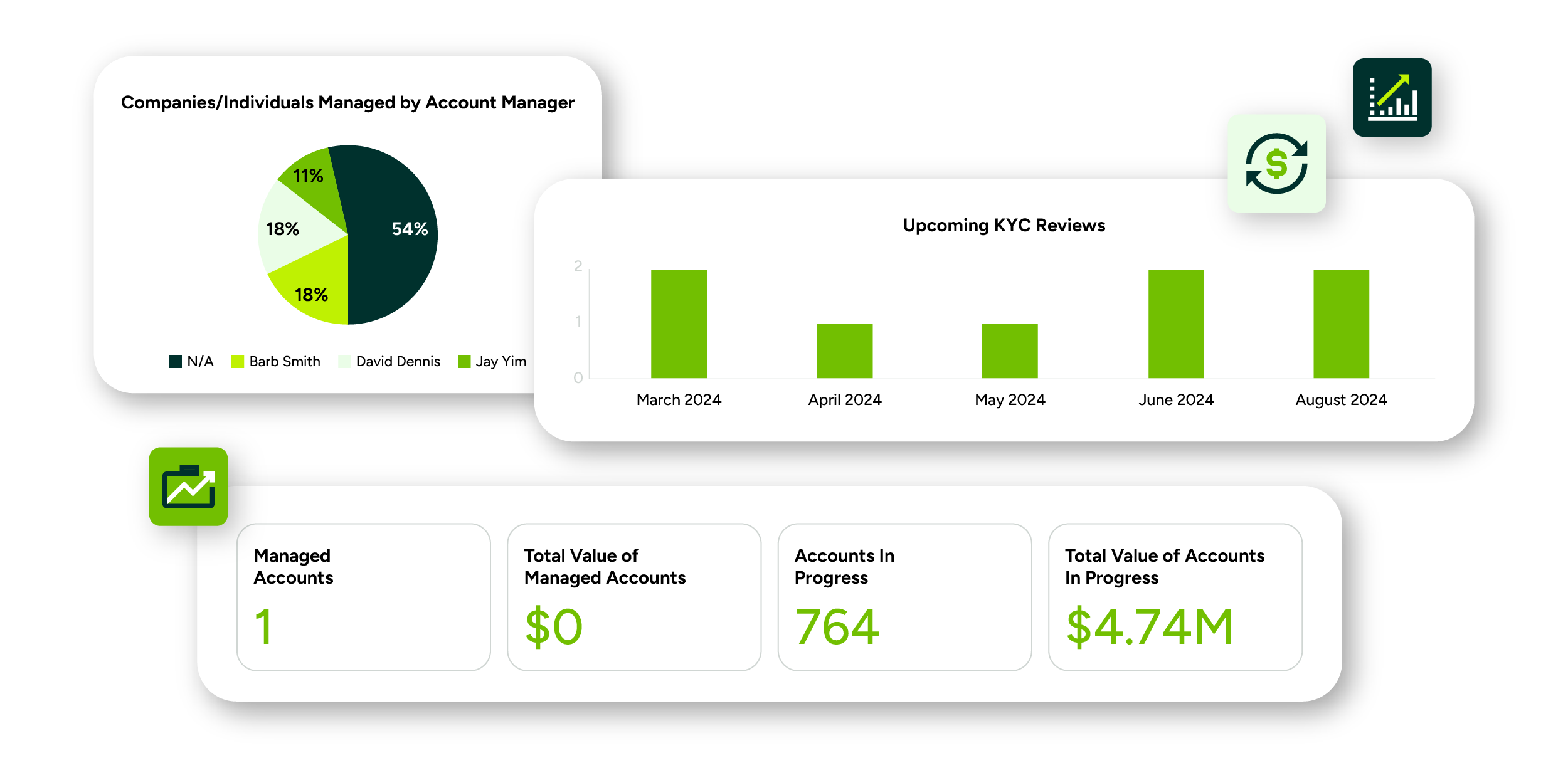
Maximizer CRM accounting dashboard with QuickBooks integration features for managing clients, KYC reviews, and account progress.
Top 5 CRM solutions for accounting firms
1. Maximizer CRM: Best for comprehensive client and workflow management
Maximizer CRM is a powerful and flexible solution tailored to meet the complex needs of accounting professionals. It offers a well-rounded combination of client management, workflow automation, compliance tracking, and business analytics. For firms looking to centralize operations and improve productivity, Maximizer provides the right tools to manage both day-to-day tasks and long-term growth.
Key features
Maximizer includes centralized client data storage, customizable task automation, and built-in compliance tracking that supports audit-readiness. The platform’s AI-driven analytics help firms uncover client trends and performance insights, while integrations with Microsoft 365 support efficient document handling and financial workflows. These features make it easy to track engagement lifecycles, monitor key deadlines, and manage team responsibilities from a single dashboard.
Pros
One of Maximizer CRM’s core strengths is its ability to scale across firm sizes. Whether you’re a solo accountant or managing a large team, the interface remains easy to navigate and flexible enough to support custom workflows. Its reporting capabilities offer detailed client insights that go beyond surface-level metrics, helping firms identify high-value clients and improve service delivery.
Cons
Because Maximizer is highly configurable, the initial setup phase may require time to tailor the platform to your firm’s specific workflows. However, once configured, the efficiency gains and process improvements make the investment worthwhile.
Pricing
-
Base Edition: $89/month
-
Sales Leader: $100/month
-
Financial Advisor Edition: $100/month
Why it stands out
Maximizer CRM for accounting is designed to handle the pressure of tax season and the complexity of ongoing client work. Its combination of automation, analytics, and integrations makes it one of the best CRM solutions for accounting firms looking to modernize operations without sacrificing control.
2. TaxDome: Best for all-in-one accounting practice management
TaxDome is a comprehensive platform built specifically for accountants and tax professionals. It combines client management, communication, workflow automation, and document handling into one powerful system. For firms looking to eliminate the need for multiple disconnected tools, TaxDome offers a unified solution that simplifies practice operations.
Key features
TaxDome includes a secure client portal, built-in e-signature capabilities, advanced workflow automation, and tax-specific tools for managing documents and communication. The platform allows firms to build out repeatable processes for tasks like document collection, engagement letters, and filing approvals. Everything is housed within a single dashboard, making it easy to manage the full lifecycle of a client relationship.
Pros
TaxDome excels at consolidating key functions that many firms previously handled across multiple platforms. Its strong client communication features, including a messaging center and client-facing portal, help boost collaboration and improve service delivery. With consistently high ratings on review platforms like Capterra, users praise its ability to bring order to chaotic or fragmented workflows.
Cons
The platform’s depth can be overwhelming for solo accountants or smaller firms. TaxDome’s comprehensive feature set comes with a learning curve, and its pricing model may be less accessible for individuals or lean teams.
Pricing
- Essentials: $1000/year, per user
- Pro: $1200/year, per user
- Business: $1500/year, per user
Why it stands out
Designed from the ground up for accounting and tax workflows, TaxDome is a strong choice for firms that want an all-in-one solution to handle communication, task management, and document control in one place.
3. Accelo: Best for service-based accounting firms
Accelo is a CRM and project management hybrid designed to support professional service firms, including accounting practices. It’s especially useful for firms that operate on retainer or project-based models, offering tools for time tracking, client billing, and task coordination that go beyond traditional CRM functionality.
Key features
Accelo includes modules for sales, project management, service tickets, and automated billing, all integrated into a single client management system. The platform offers workflow tools for tracking billable hours, managing internal deadlines, and maintaining service level agreements (SLAs). With integrations for QuickBooks and Xero, it’s well-positioned to support accounting firms that need to manage client services and reporting in parallel.
Pros
The platform’s strength lies in its ability to support client relationships beyond just data tracking. It offers real-time visibility into project status and financial performance, which is ideal for firms juggling multiple ongoing engagements. Its automation tools help eliminate repetitive admin tasks and ensure work stays on schedule.
Cons
Accelo’s focus on service delivery means it doesn’t have the same depth of tax-specific tools as some accounting CRMs. It may also take some time to onboard users due to its expansive feature set and slightly steeper learning curve.
Pricing
Custom pricing options are available.
Why it stands out
Accelo is a top choice for accounting firms that operate like consulting businesses, handling long-term client projects, ongoing retainers, and performance-based contracts with efficiency and clarity.
4. HubSpot CRM: Best for free starter option
HubSpot CRM is a popular platform for businesses of all kinds, and its free plan makes it especially attractive to small accounting firms or solo practitioners looking to get started with CRM software. While it isn’t built specifically for the accounting industry, its contact management, task tracking, and communication tools offer enough flexibility for basic client oversight.
Key features
The free plan includes contact and pipeline management, task tracking, email templates, and a visual dashboard. Users can integrate HubSpot with QuickBooks to sync invoicing and financial data. For those who need more, paid plans add tools like advanced automation, reporting, and email marketing.
Pros
HubSpot CRM is extremely user-friendly and requires minimal setup, making it perfect for firms that are new to CRM technology. It allows you to manage up to 2,500 contacts at no cost and provides room to grow with scalable features. It also offers a wide range of integrations, from financial tools to communication apps.
Cons
The platform lacks tax-specific features like document requests, engagement letter templates, or compliance tracking. Additionally, more advanced automation and workflow tools are locked behind paid tiers, which may become necessary as the firm grows.
Pricing
-
Free Plan: $0/month
-
Professional: $1,034/month
-
Enterprise: $4,700/month
Why it stands out
HubSpot is one of the best CRM options for accounting firms on a budget. Its free plan offers essential features with a clean, modern interface, making it ideal for small firms that want to start organizing client interactions without a financial commitment.
5. Zoho CRM: Best for customization and affordability
Zoho CRM is a flexible, affordable solution that works well for accounting firms that need to build out their own workflows and integrations. It’s part of the larger Zoho ecosystem, making it especially useful for firms already using tools like Zoho Books, Zoho Projects, or Zoho Analytics.
Key features
Zoho CRM includes customizable pipelines, workflow automations, multi-currency support, and integrations with accounting tools like QuickBooks. It also offers AI-driven insights that help identify patterns in client behaviour and engagement. Users can personalize dashboards, automate reminders, and link CRM records to financial data from connected apps.
Pros
The platform is highly affordable, with a free version for up to three users and paid plans starting at competitive rates. It’s also extremely customizable, allowing accounting firms to tailor the system to their unique processes, client types, and reporting needs. Its ecosystem of add-ons provides flexibility that few other platforms can match at this price point.
Cons
Zoho CRM is not focused exclusively on accounting, so firms may need to invest time configuring it for tax-specific or audit-related workflows. Additionally, mastering the full capabilities of the platform may require some technical learning or outside assistance.
Pricing
-
Free edition: $0/month
-
Standard: $35/user/month
-
Professional: $44/user/month
-
Enterprise: $63/user/month
Why it stands out
Zoho CRM is one of the most adaptable platforms available, ideal for firms that want full control over their CRM experience. It’s a strong fit for accounting firms seeking a balance of affordability, customization, and functionality, especially those already using Zoho tools.
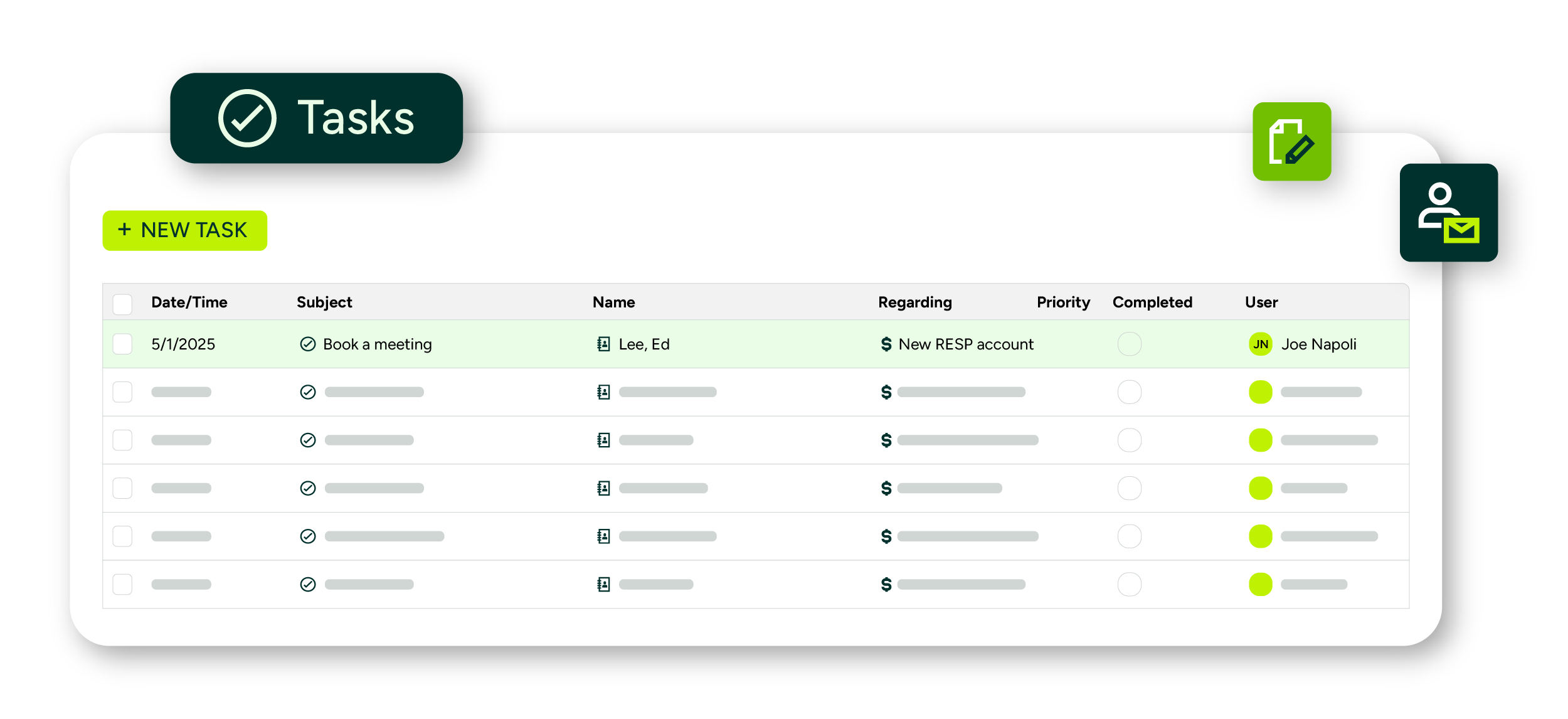
Maximizer CRM accounting software displaying organized team task lists.
How to choose the right CRM for your accounting firm
Step 1: Assess your firm size and client needs
The first step in choosing the best CRM for accounting firms is to understand your firm’s size, structure, and the type of clients you serve. A solo accountant working with small business clients may need a simple, user-friendly solution with basic workflow automation. In contrast, a mid-sized or multi-partner firm handling a mix of corporate clients, tax planning, and advisory services will require more robust capabilities, including role-based access, analytics, and document management.
Consider whether your firm focuses on one-time engagements like tax filing or ongoing services like bookkeeping and payroll. The right CRM should reflect how you operate and scale according to your client volume. If you plan to grow your client base or team, choose a platform that supports user expansion and workflow customization from the start.
-
Match CRM features to your firm’s structure: Consider the number of users and the complexity of services offered.
-
Identify whether you serve recurring or project-based clients: Workflow needs will differ for each.
-
Plan for future growth: Choose a platform that can scale without requiring a system overhaul.
Step 2: Verify compatibility with accounting tools
Your CRM should complement the accounting software and platforms you already use, not compete with them. Whether you rely on QuickBooks, Xero, Zoho Books, or Excel-based reporting, integration is key to eliminating duplicate data entry and reducing workflow friction. Without compatibility, your team will be forced to toggle between systems, increasing the risk of inconsistencies and wasting valuable time.
Look for CRM solutions that offer native integrations or open API access to ensure that data can flow freely between systems. This is especially important when syncing client contact details, billing history, or engagement progress. Platforms like Maximizer CRM for accounting stand out in this area with integrations that link directly to both financial tools and communication systems like Microsoft 365.
-
Check for native integrations: Platforms that connect directly to QuickBooks, Xero, or Microsoft 365 will simplify your workflows.
-
Reduce manual entry risk: Syncing ensures more accurate and up-to-date records.
-
Ensure data flows across platforms: A CRM should act as a central hub, not a silo.
Step 3: Prioritize automation and data security
Efficiency and security go hand in hand when choosing accounting CRM software. Automation tools such as recurring task generation, email reminders, and workflow triggers can dramatically reduce the administrative burden on your team. These features are especially useful during tax season or financial year-end when the workload spikes and the margin for error narrows.
Equally important is the CRM’s approach to data protection. Accounting firms handle some of the most sensitive client information, from banking details to tax records, and must ensure that this data is stored and shared securely. Look for platforms that offer encryption, multi-factor authentication, user access controls, and audit logs. These tools not only help maintain compliance but also build client trust.
-
Automate repetitive tasks: Use workflow triggers and reminders to reduce admin load.
-
Protect sensitive data: Prioritize CRMs with encryption and secure user permissions.
-
Support compliance readiness: Look for audit logs and version control for financial documents.
Step 4: Test usability and support options
Even the most feature-rich CRM won’t benefit your firm if it’s difficult to use. Usability should be a top priority in your decision-making process. Evaluate whether the platform offers a clean interface, logical navigation, and an intuitive setup process. Many providers offer free trials; use them to assess whether the software aligns with your team’s daily workflow and comfort level.
Support is equally important. Check whether the CRM vendor offers onboarding assistance, ongoing training, and responsive customer service. These resources can make a huge difference during implementation and beyond, especially if your team is transitioning from spreadsheets or outdated tools. A platform like Maximizer CRM for accounting delivers well on both ease of use and accessible support, making it a strong contender for firms at any stage of CRM adoption.
-
Choose a platform with a low learning curve: Make sure your team can adopt it quickly.
-
Test drive with a free trial: Validate whether it matches your firm’s workflow.
-
Evaluate training and support resources: Strong customer service ensures long-term value.
Why Maximizer CRM is a top choice for accounting CRM Software for Accounting firms
Tailored solutions for accounting and tax workflows
Maximizer Accounting CRM Software is uniquely equipped to handle the recurring, deadline-driven nature of financial services. Unlike one-size-fits-all CRMs, Maximizer allows firms to build workflows that reflect the stages of real accounting tasks, from onboarding and document collection to monthly bookkeeping and tax filing. These workflows help standardize how services are delivered, reducing the margin for error and improving consistency across clients. By tailoring automation rules, reminders, and task triggers to each type of engagement, firms can stay organized without adding administrative complexity. This is especially valuable during peak periods when managing client load and maintaining compliance are critical.
-
Built for recurring services: Ideal for tax, bookkeeping, and advisory workflows.
-
Configurable task sequences: Set engagement-specific workflows to reduce missed steps.
-
Tax season ready: Designed to help firms stay on schedule during high-volume periods.
Improved client, task, and compliance management
Accounting firms need more than contact lists, they need complete visibility into every stage of the client relationship. Maximizer CRM provides this by consolidating client data, tasks, documents, and communication history in one centralized location. This makes it easy to monitor progress, assign responsibilities, and ensure every engagement is on track.
The platform also supports compliance management through audit logs, role-based permissions, and secure file storage. These features ensure that sensitive client data is protected while helping firms meet their regulatory obligations without adding operational friction.
-
Full lifecycle tracking: Monitor client communications, document uploads, and task progress.
-
Audit-ready compliance tools: Maintain complete logs of activity and document access.
-
Secure collaboration: Share information with staff securely using access controls.
Trusted integrations for improved operations
Maximizer, the accounting CRM software firms integrates with key tools that accountants use daily, like Microsoft 365 for email, calendar, and document workflows. These integrations reduce the need to jump between applications and help maintain consistent, up-to-date records across systems.
By syncing accounting data and communication tools with the CRM, firms can eliminate data silos and improve processes. Whether you’re generating invoices, responding to client emails, or updating task progress, everything can be managed from within a single interface, increasing efficiency and accuracy.
-
QuickBooks integration: View client financials and billing history directly within the CRM.
-
Microsoft 365 compatibility: Manage Outlook emails, appointments, and files easily.
-
Connected operations: Reduce manual input and keep data synchronized across platforms.
Subscribe to our Newsletter
Related Articles
